> ## Documentation Index
> Fetch the complete documentation index at: https://checkly-422f444a-paula-tree-202-entitlements-group-troubles.mintlify.site/llms.txt
> Use this file to discover all available pages before exploring further.
# Alert Channels
> Configure notification channels to receive alerts when checks fail, degrade, or recover. Choose from email, Slack, webhooks, PagerDuty, SMS, and custom integrations.
Alert channels determine **how** alert notifications reach your team when checks fail, degrade, or recover. Checkly supports a wide range of notification methods to fit your team's communication preferences and operational workflows.
## Available Alert Channels
### Communication Platforms
* [**Email**](/integrations/alerts/email): Direct email notifications
* [**Slack**](/integrations/alerts/slack): Team channel integration
* [**Discord**](/integrations/alerts/discord): Community and team chat
* [**Telegram**](/integrations/alerts/telegram): Mobile messaging
* [**SMS & Phone**](/integrations/alerts/sms): Text messages and voice calls
* [**Microsoft Teams**](/integrations/alerts/msteams): Enterprise team collaboration
### Incident Management
* [**PagerDuty**](/integrations/incident-management/pagerduty): On-call management
* [**Opsgenie**](/integrations/incident-management/opsgenie): Alert orchestration
* [**FireHydrant**](/integrations/incident-management/firehydrant): Incident response
* [**Incident.io**](/integrations/incident-management/incidentio): Incident coordination
* [**Rootly**](/integrations/incident-management/rootly): Post-incident analysis
* [**ilert**](/integrations/incident-management/ilert): Alert automation
* [**Splunk On-Call**](/integrations/incident-management/splunk_on_call): Enterprise alerting
* [**Spike.sh**](/integrations/alerts/spike): Developer alerts
### Custom Integrations
* [**Webhooks**](/integrations/alerts/webhooks): Custom API endpoints
* [**StatusPage**](/integrations/alerts/statuspage): Public status pages
## Managing Alert Channels
### Channel Configuration Overview
Configure channels with flexible subscription and filtering options:
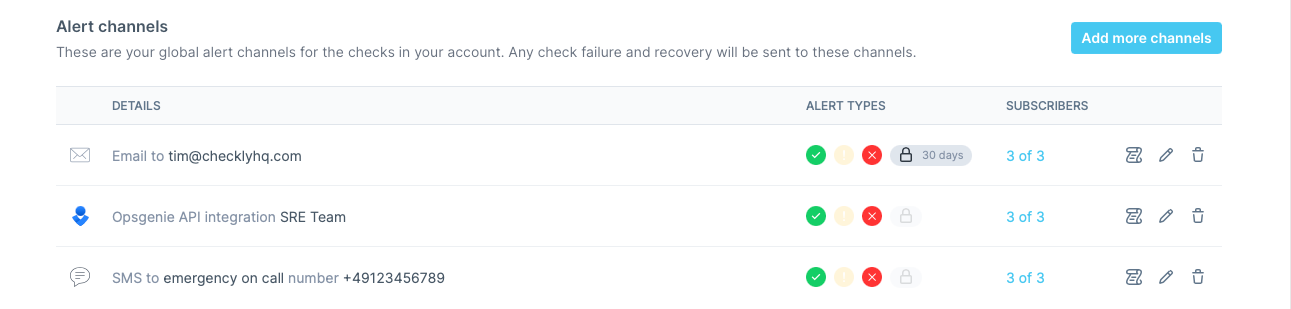 Choose your notification method and provide connection details
Select which types of events should trigger notifications
Choose which checks and check groups use this channel
Verify the channel works correctly with test notifications
Use Checkly's alert notification log to track delivery success rates and identify any channels that frequently fail to deliver notifications.
Choose your notification method and provide connection details
Select which types of events should trigger notifications
Choose which checks and check groups use this channel
Verify the channel works correctly with test notifications
Use Checkly's alert notification log to track delivery success rates and identify any channels that frequently fail to deliver notifications.