> ## Documentation Index
> Fetch the complete documentation index at: https://checkly-422f444a-paula-tree-202-entitlements-group-troubles.mintlify.site/llms.txt
> Use this file to discover all available pages before exploring further.
# Agent Configuration
> Advanced configuration options for Checkly Agents including environment variables, scaling settings, security options, and production deployment best practices.
# Checkly Agent Configuration
The Checkly Agent is a lightweight container that executes monitoring checks within your Private Location. This guide covers advanced configuration options, environment variables, security settings, and production deployment practices.
## Environment Variables
Configure your Checkly Agent using these environment variables:
### Essential Configuration
| Variable | Description | Default |
| ----------------- | --------------------------------------------------------------- | ------- |
| `API_KEY` | **Required.** Private Location API key for agent authentication | - |
| `JOB_CONCURRENCY` | Number of concurrent checks (1-10) | `1` |
| `LOG_LEVEL` | Agent logging verbosity | `INFO` |
### Network and Proxy Configuration
| Variable | Description |
| --------------------- | ---------------------------------------- |
| `HTTPS_PROXY` | HTTPS proxy for agent management traffic |
| `HTTP_PROXY` | HTTP proxy for agent management traffic |
| `USE_OS_DNS_RESOLVER` | Use system DNS instead of network DNS |
These proxy settings apply to agent management traffic to Checkly's API. For check-specific proxy configuration, see the [Proxy Setup guide](/detect/private-locations/proxy-setup).
### Security and TLS Configuration
| Variable | Description |
| ------------------------------ | ------------------------------------------------ |
| `NODE_EXTRA_CA_CERTS` | Path to additional CA certificates |
| `NODE_TLS_REJECT_UNAUTHORIZED` | Allow self-signed certificates (not recommended) |
## Production Deployment Examples
### Docker with Resource Limits
```bash theme={null}
docker run \
--name checkly-agent-prod \
--restart unless-stopped \
--memory="4g" \
--cpus="2" \
-e API_KEY="pl_abc123..." \
-e JOB_CONCURRENCY=5 \
-e LOG_LEVEL="INFO" \
--log-driver json-file \
--log-opt max-size=100m \
--log-opt max-file=3 \
-d checkly/agent:6.0.3
```
### Docker Compose
```yaml theme={null}
version: '3.8'
services:
checkly-agent:
image: checkly/agent:6.0.3
container_name: checkly-agent-prod
restart: unless-stopped
environment:
- API_KEY=${CHECKLY_API_KEY}
- JOB_CONCURRENCY=5
- LOG_LEVEL=INFO
deploy:
resources:
limits:
memory: 4G
cpus: '2'
reservations:
memory: 2G
cpus: '1'
logging:
driver: json-file
options:
max-size: "100m"
max-file: "3"
networks:
- monitoring
networks:
monitoring:
driver: bridge
```
### Systemd Service
Create `/etc/systemd/system/checkly-agent.service`:
```ini theme={null}
[Unit]
Description=Checkly Agent
After=docker.service
Requires=docker.service
[Service]
Type=oneshot
RemainAfterExit=yes
ExecStartPre=/usr/bin/docker pull checkly/agent:6.0.3
ExecStart=/usr/bin/docker run \
--name checkly-agent \
--restart unless-stopped \
--memory="4g" \
--cpus="2" \
-e API_KEY=%i \
-e JOB_CONCURRENCY=5 \
-d checkly/agent:6.0.3
ExecStop=/usr/bin/docker stop checkly-agent
ExecStopPost=/usr/bin/docker rm checkly-agent
[Install]
WantedBy=multi-user.target
```
Enable and start:
```bash theme={null}
sudo systemctl enable checkly-agent@"pl_your_api_key"
sudo systemctl start checkly-agent@"pl_your_api_key"
```
## Local Development Setup
For local testing and development, use Docker Desktop to bridge to localhost services:
```bash theme={null}
# Start agent for local development
docker run \
-e API_KEY="pl_dev_key..." \
-e LOG_LEVEL="DEBUG" \
-e JOB_CONCURRENCY=1 \
--name checkly-agent-dev \
-d checkly/agent:latest
# Test local service (use host.docker.internal for localhost access)
curl -X POST https://api.checklyhq.com/v1/checks \
-H "Authorization: Bearer your_api_token" \
-d '{
"name": "Local API Test",
"type": "api",
"request": {
"method": "GET",
"url": "http://host.docker.internal:3000/health"
},
"privateLocations": ["your-dev-location"]
}'
```
Use `host.docker.internal` instead of `localhost` to access services running on your host machine from within Docker containers.
## Agent Lifecycle Management
### Monitoring Agent Health
Check agent status and logs:
```bash theme={null}
# View running agents
docker ps --filter "ancestor=checkly/agent"
# Check agent logs
docker logs checkly-agent --tail 50 -f
# Monitor resource usage
docker stats checkly-agent
```
**Healthy agent logs should show:**
```
[checkly-agent] Starting Consumer c7495186-6f1e-4526-b173-14ee9ad21775
[checkly-agent] Agent connected to Private Location
[checkly-agent] No jobs. Waiting..
[checkly-agent] Executing check: api-health-check-123
[checkly-agent] Check completed successfully
```
### Agent Updates
**Production Update Strategy**: Use caution with automatic updates. Pin specific versions in production and test updates in staging first.
#### Manual Updates
```bash theme={null}
# 1. Pull latest image
docker pull checkly/agent:latest
# 2. Stop current agent
docker stop checkly-agent
# 3. Remove old container
docker rm checkly-agent
# 4. Start updated agent
docker run \
-e API_KEY="pl_abc123..." \
-e JOB_CONCURRENCY=5 \
--name checkly-agent \
-d checkly/agent:latest
# 5. Verify new agent
docker logs checkly-agent --tail 20
```
#### Automated Updates with Watchtower
```bash theme={null}
# Install Watchtower for automatic container updates
docker run -d \
--name watchtower \
--restart unless-stopped \
-v /var/run/docker.sock:/var/run/docker.sock \
containrrr/watchtower \
--schedule "0 0 4 * * SUN" \
--cleanup \
checkly-agent
# Manual update trigger
docker run --rm -v /var/run/docker.sock:/var/run/docker.sock \
containrrr/watchtower --run-once checkly-agent
```
#### Rolling Updates for Multiple Agents
```bash theme={null}
#!/bin/bash
# rolling-update.sh - Update agents one by one
AGENTS=("checkly-agent-1" "checkly-agent-2" "checkly-agent-3")
API_KEY="pl_your_api_key"
for agent in "${AGENTS[@]}"; do
echo "Updating $agent..."
# Pull latest image
docker pull checkly/agent:latest
# Start new agent with temporary name
docker run \
-e API_KEY="$API_KEY" \
-e JOB_CONCURRENCY=5 \
--name "${agent}-new" \
-d checkly/agent:latest
# Wait for new agent to connect
sleep 30
# Stop and remove old agent
docker stop "$agent"
docker rm "$agent"
# Rename new agent
docker rename "${agent}-new" "$agent"
echo "$agent updated successfully"
sleep 10 # Brief pause between updates
done
```
## API Key Management
### Key Rotation Process
Rotate API keys regularly for security:
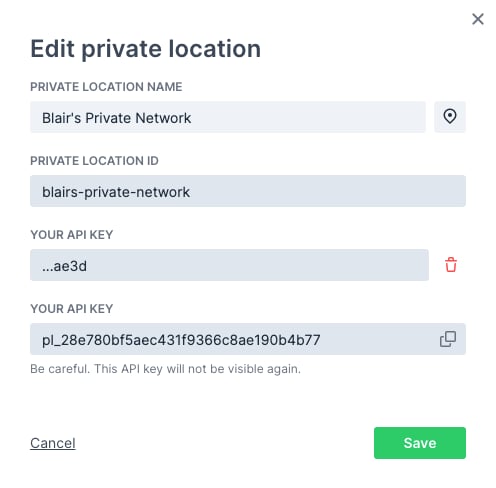 1. **Add second key** in the Checkly UI
2. **Deploy new agents** with the new key
3. **Verify connectivity** of new agents
4. **Remove old agents** using the old key
5. **Delete old key** from Checkly UI
1. **Add second key** in the Checkly UI
2. **Deploy new agents** with the new key
3. **Verify connectivity** of new agents
4. **Remove old agents** using the old key
5. **Delete old key** from Checkly UI
 ### Zero-Downtime Key Rotation
```bash theme={null}
#!/bin/bash
# key-rotation.sh
OLD_KEY="pl_old_key..."
NEW_KEY="pl_new_key..."
# Start new agents with new key
for i in {1..3}; do
docker run \
-e API_KEY="$NEW_KEY" \
-e JOB_CONCURRENCY=5 \
--name "checkly-agent-new-$i" \
-d checkly/agent:latest
done
# Wait for new agents to connect
echo "Waiting for new agents to connect..."
sleep 60
# Stop old agents
for i in {1..3}; do
docker stop "checkly-agent-old-$i"
docker rm "checkly-agent-old-$i"
done
# Rename new agents
for i in {1..3}; do
docker rename "checkly-agent-new-$i" "checkly-agent-$i"
done
echo "Key rotation completed successfully"
```
### Finding API Keys in Running Containers
```bash theme={null}
# Inspect container for API key
docker inspect checkly-agent | grep -A5 -B5 "API_KEY"
# List all containers with their API keys
docker ps --format "table {{.Names}}\t{{.Image}}" | while read name image; do
if [[ $image == *"checkly/agent"* ]]; then
key=$(docker inspect $name | jq -r '.[0].Config.Env[]' | grep API_KEY | cut -d'=' -f2)
echo "$name: ${key: -8}" # Show last 8 characters
fi
done
```
## Agent Versions and Runtime Compatibility
Each agent version supports a specific Checkly runtime:
| Runtime Version | Agent Version | Features |
| --------------- | ------------- | ----------------------------- |
| 2025.04 | 6.0.3+ | Latest Playwright, Node.js 20 |
| 2024.09 | 5.0.0+ | Playwright Test Suites |
| 2024.02 | 3.4.0+ | Enhanced security |
| 2023.09 | 3.2.0+ | Improved performance |
| 2023.02 | 2.0.0+ | Core functionality |
| 2022.10 | 1.3.9 | Legacy support |
**Version Pinning**: Always pin specific agent versions in production. Use `checkly/agent:6.0.3` instead of `checkly/agent:latest` to ensure consistent behavior.
### Checking Runtime Compatibility
```bash theme={null}
# Check agent version
docker exec checkly-agent cat /app/package.json | grep version
# Check supported runtime
docker exec checkly-agent node -e "console.log(process.env.RUNTIME_VERSION || 'Not set')"
# View agent capabilities
docker exec checkly-agent node -e "
const pkg = require('/app/package.json');
console.log('Agent version:', pkg.version);
console.log('Node.js version:', process.version);
console.log('Platform:', process.platform);
"
```
## Troubleshooting
### Agent Won't Connect
**Symptoms**: Agent starts but doesn't appear in Private Locations dashboard
**Solutions**:
1. **Check API key**: Verify the key is correct and hasn't been deleted
```bash theme={null}
docker logs checkly-agent | grep -i "auth\|key\|error"
```
2. **Verify network access**: Ensure outbound HTTPS to `agent.checklyhq.com`
```bash theme={null}
docker exec checkly-agent curl -I https://agent.checklyhq.com
```
3. **Check proxy configuration**: If using a proxy, verify settings
```bash theme={null}
docker exec checkly-agent env | grep -i proxy
```
### TLS Certificate Issues
**Symptoms**: SSL/TLS connection errors in logs
**Solutions**:
1. **Add enterprise CA certificates**:
```bash theme={null}
docker run \
-v /path/to/ca.crt:/usr/local/share/ca-certificates/company.crt \
-e NODE_EXTRA_CA_CERTS=/usr/local/share/ca-certificates/company.crt \
-e API_KEY="pl_..." \
-d checkly/agent:latest
```
2. **Temporarily bypass TLS verification** (not recommended for production):
```bash theme={null}
docker run \
-e NODE_TLS_REJECT_UNAUTHORIZED=0 \
-e API_KEY="pl_..." \
-d checkly/agent:latest
```
### Resource and Performance Issues
**Symptoms**: Slow check execution, out of memory errors
**Solutions**:
1. **Optimize job concurrency** based on available memory:
```bash theme={null}
# For 4GB memory with mixed workloads
docker run \
-e JOB_CONCURRENCY=2 \
--memory="4g" \
-e API_KEY="pl_..." \
-d checkly/agent:latest
```
2. **Monitor resource usage**:
```bash theme={null}
docker stats checkly-agent --no-stream
```
3. **Check for memory leaks**:
```bash theme={null}
# Monitor memory usage over time
while true; do
docker stats checkly-agent --no-stream --format "table {{.MemUsage}}\t{{.CPUPerc}}"
sleep 30
done
```
### Check Execution Issues
**Symptoms**: Checks fail only from private location
**Solutions**:
1. **Test network connectivity**:
```bash theme={null}
# Test from within agent container
docker exec checkly-agent curl -I http://your-internal-service.local
```
2. **Check DNS resolution**:
```bash theme={null}
docker exec checkly-agent nslookup your-service.internal
```
3. **Enable OS DNS resolver** for internal services:
```bash theme={null}
docker run \
-e USE_OS_DNS_RESOLVER=true \
-e API_KEY="pl_..." \
-d checkly/agent:latest
```
## Best Practices
* Pin specific agent versions in production
* Rotate API keys regularly (quarterly)
* Use secrets management for API keys
* Enable TLS certificate validation
* Monitor agent access logs
* Deploy at least 2 agents per location
* Use container restart policies
* Implement health checks
* Monitor agent connectivity
* Plan for rolling updates
* Right-size job concurrency for your workload
* Monitor memory usage patterns
* Use resource limits in production
* Scale horizontally when needed
* Profile check execution times
* Centralize logging and monitoring
* Automate agent deployment
* Document configuration decisions
* Test updates in staging first
* Maintain update procedures
### Zero-Downtime Key Rotation
```bash theme={null}
#!/bin/bash
# key-rotation.sh
OLD_KEY="pl_old_key..."
NEW_KEY="pl_new_key..."
# Start new agents with new key
for i in {1..3}; do
docker run \
-e API_KEY="$NEW_KEY" \
-e JOB_CONCURRENCY=5 \
--name "checkly-agent-new-$i" \
-d checkly/agent:latest
done
# Wait for new agents to connect
echo "Waiting for new agents to connect..."
sleep 60
# Stop old agents
for i in {1..3}; do
docker stop "checkly-agent-old-$i"
docker rm "checkly-agent-old-$i"
done
# Rename new agents
for i in {1..3}; do
docker rename "checkly-agent-new-$i" "checkly-agent-$i"
done
echo "Key rotation completed successfully"
```
### Finding API Keys in Running Containers
```bash theme={null}
# Inspect container for API key
docker inspect checkly-agent | grep -A5 -B5 "API_KEY"
# List all containers with their API keys
docker ps --format "table {{.Names}}\t{{.Image}}" | while read name image; do
if [[ $image == *"checkly/agent"* ]]; then
key=$(docker inspect $name | jq -r '.[0].Config.Env[]' | grep API_KEY | cut -d'=' -f2)
echo "$name: ${key: -8}" # Show last 8 characters
fi
done
```
## Agent Versions and Runtime Compatibility
Each agent version supports a specific Checkly runtime:
| Runtime Version | Agent Version | Features |
| --------------- | ------------- | ----------------------------- |
| 2025.04 | 6.0.3+ | Latest Playwright, Node.js 20 |
| 2024.09 | 5.0.0+ | Playwright Test Suites |
| 2024.02 | 3.4.0+ | Enhanced security |
| 2023.09 | 3.2.0+ | Improved performance |
| 2023.02 | 2.0.0+ | Core functionality |
| 2022.10 | 1.3.9 | Legacy support |
**Version Pinning**: Always pin specific agent versions in production. Use `checkly/agent:6.0.3` instead of `checkly/agent:latest` to ensure consistent behavior.
### Checking Runtime Compatibility
```bash theme={null}
# Check agent version
docker exec checkly-agent cat /app/package.json | grep version
# Check supported runtime
docker exec checkly-agent node -e "console.log(process.env.RUNTIME_VERSION || 'Not set')"
# View agent capabilities
docker exec checkly-agent node -e "
const pkg = require('/app/package.json');
console.log('Agent version:', pkg.version);
console.log('Node.js version:', process.version);
console.log('Platform:', process.platform);
"
```
## Troubleshooting
### Agent Won't Connect
**Symptoms**: Agent starts but doesn't appear in Private Locations dashboard
**Solutions**:
1. **Check API key**: Verify the key is correct and hasn't been deleted
```bash theme={null}
docker logs checkly-agent | grep -i "auth\|key\|error"
```
2. **Verify network access**: Ensure outbound HTTPS to `agent.checklyhq.com`
```bash theme={null}
docker exec checkly-agent curl -I https://agent.checklyhq.com
```
3. **Check proxy configuration**: If using a proxy, verify settings
```bash theme={null}
docker exec checkly-agent env | grep -i proxy
```
### TLS Certificate Issues
**Symptoms**: SSL/TLS connection errors in logs
**Solutions**:
1. **Add enterprise CA certificates**:
```bash theme={null}
docker run \
-v /path/to/ca.crt:/usr/local/share/ca-certificates/company.crt \
-e NODE_EXTRA_CA_CERTS=/usr/local/share/ca-certificates/company.crt \
-e API_KEY="pl_..." \
-d checkly/agent:latest
```
2. **Temporarily bypass TLS verification** (not recommended for production):
```bash theme={null}
docker run \
-e NODE_TLS_REJECT_UNAUTHORIZED=0 \
-e API_KEY="pl_..." \
-d checkly/agent:latest
```
### Resource and Performance Issues
**Symptoms**: Slow check execution, out of memory errors
**Solutions**:
1. **Optimize job concurrency** based on available memory:
```bash theme={null}
# For 4GB memory with mixed workloads
docker run \
-e JOB_CONCURRENCY=2 \
--memory="4g" \
-e API_KEY="pl_..." \
-d checkly/agent:latest
```
2. **Monitor resource usage**:
```bash theme={null}
docker stats checkly-agent --no-stream
```
3. **Check for memory leaks**:
```bash theme={null}
# Monitor memory usage over time
while true; do
docker stats checkly-agent --no-stream --format "table {{.MemUsage}}\t{{.CPUPerc}}"
sleep 30
done
```
### Check Execution Issues
**Symptoms**: Checks fail only from private location
**Solutions**:
1. **Test network connectivity**:
```bash theme={null}
# Test from within agent container
docker exec checkly-agent curl -I http://your-internal-service.local
```
2. **Check DNS resolution**:
```bash theme={null}
docker exec checkly-agent nslookup your-service.internal
```
3. **Enable OS DNS resolver** for internal services:
```bash theme={null}
docker run \
-e USE_OS_DNS_RESOLVER=true \
-e API_KEY="pl_..." \
-d checkly/agent:latest
```
## Best Practices
* Pin specific agent versions in production
* Rotate API keys regularly (quarterly)
* Use secrets management for API keys
* Enable TLS certificate validation
* Monitor agent access logs
* Deploy at least 2 agents per location
* Use container restart policies
* Implement health checks
* Monitor agent connectivity
* Plan for rolling updates
* Right-size job concurrency for your workload
* Monitor memory usage patterns
* Use resource limits in production
* Scale horizontally when needed
* Profile check execution times
* Centralize logging and monitoring
* Automate agent deployment
* Document configuration decisions
* Test updates in staging first
* Maintain update procedures